Native macOS crypto ticker
Keep a price
in sight.
Bitcoin, Ethereum and your watchlist. One click away, in your Mac menu bar.
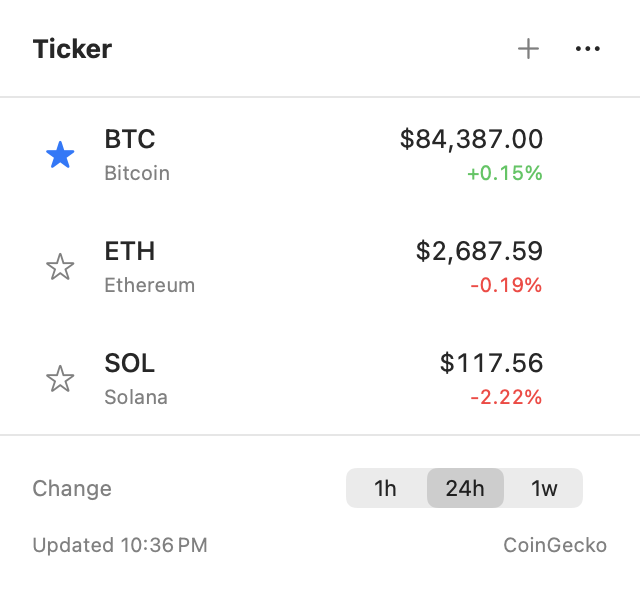
A watchlist.
Without another tab.
Add the tokens you follow. Star one to put its USD price in the menu bar. Your choices stay saved between launches.
- Choose your time frame
- Switch between 1-hour, 24-hour and 1-week percentage changes in the same popup.
- Search by name or symbol
- Press ⌘N or click + to find tokens on CoinGecko. Escape returns to your watchlist.
- Know when data is stale
- Prices refresh every minute. Ticker labels outdated data when the service cannot provide a fresh quote.
From download to menu bar.
- 01
Move it to Applications
Open the DMG and drag Ticker into Applications.
- 02
Open Ticker
Follow the security instructions for this release, then look in the menu bar.
- 03
Make it yours
Add a token. Click its star. That price stays in sight.
Before you pick a ticker.
Practical notes on menu bar apps, price data and choosing the right tool.
Comparison
Crypto tickers for Mac: what to compare
Ticker, Coin Tick and Crypto Pro serve different needs.
SetupPut Bitcoin in your Mac menu bar
A short setup guide, including what the displayed price means.
Price dataWhy your crypto ticker can show an old price
Refresh intervals, rate limits and stale data.
A few details.
Looking for alerts, trading or portfolio totals? Compare alternatives before installing.